
NOTE: Demo visuals include blurred data or synthetic placeholders to protect customer privacy.
The Recap
Tim previously demoed a quick slideshow version, but the core “Monthly Coaching Report” has now been live for CSMs for two months. Those individual reports summarize the past month’s strengths and weaknesses so reps can see patterns beyond a single call.
As adoption grew, CS leadership requested the next layer: a role-based reporting model that spans the organization. The key constraint was privacy. Managers need visibility into trends, but the content must be anonymized where appropriate.
The New Capabilities
The update introduces a monthly managerial coaching report that aggregates the AI coach's insights from calls into a team view. Managers receive a monthly summary that includes team strengths, growth opportunities, and explicit shout-outs to spotlight effort rather than automating recognition.
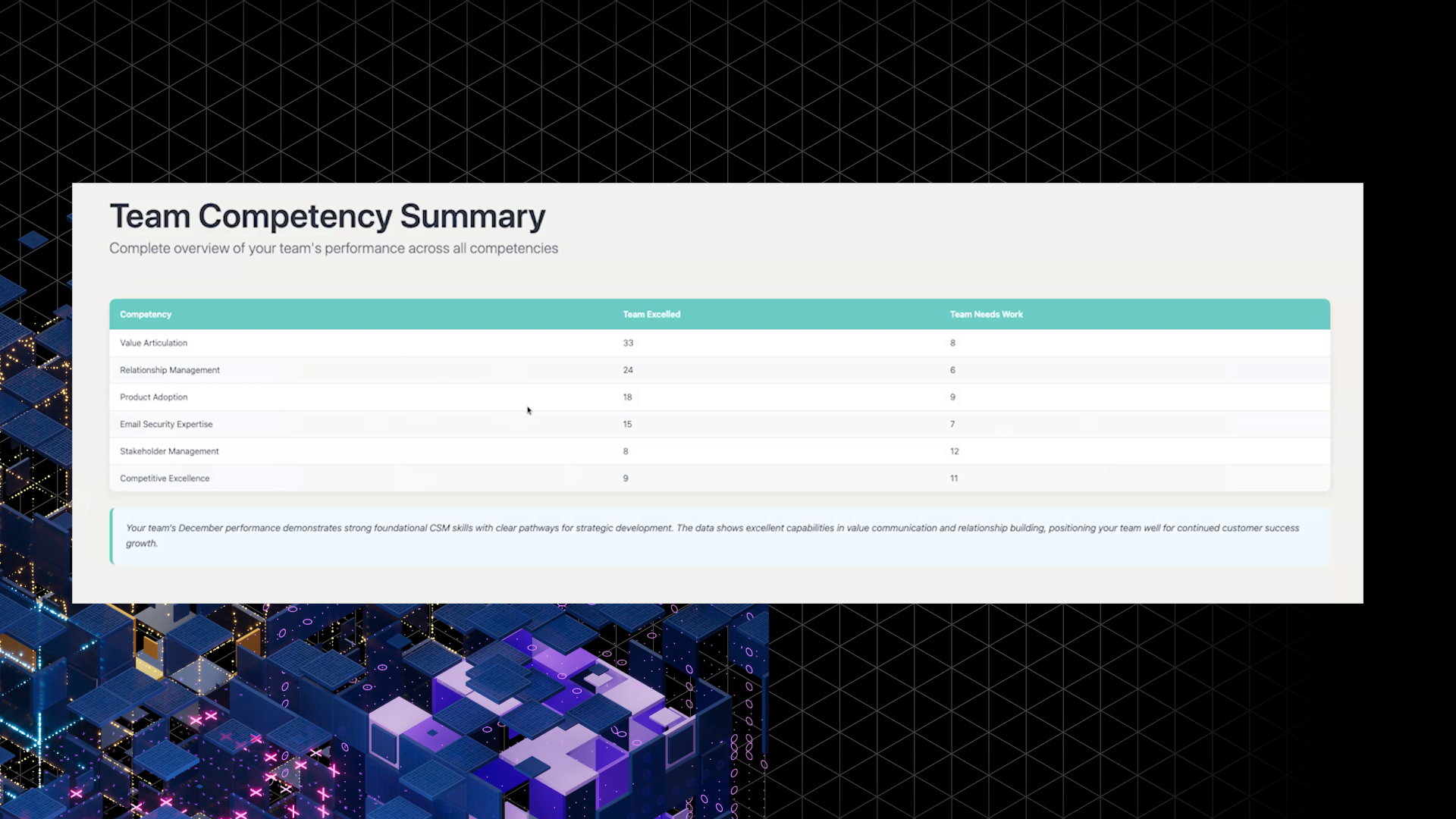
Core elements shown in the demo include:
- Team strengths + shoutouts for the month (ex, top competencies across the team based on call reviews)
- Standout performance highlights for specific competencies, calling out CSMs who particularly excelled in a category
- Team growth opportunities are summarized for the same period
- Team competency distribution so managers can track progress over time (with an HTML version and a PowerPoint version being aligned)
- Team moments from Okta config, like new joiners, birthdays, and work anniversaries, are included as a lightweight context for managers
The Impact
This change shifts the monthly report from “help each CSM improve” to “help leaders invest in the right enablement, while still celebrating people.” It gives managers and CS Ops a consistent way to see what’s happening across dozens of calls without reading individual coaching threads.
What it enables for different audiences:
- Managers: a quick read on team strengths, gaps, and shoutouts, plus an easier way to recognize real work without digging through call-by-call detail
- CS Ops and Enablement: an aggregated signal to plan training and resource allocation for the next quarter across multiple teams
- CS leadership: trend visibility across echelons, supporting consistent coaching and reinforcement of the behaviors the org wants to scale
Next step: finish polishing the report outputs so the PowerPoint template matches the HTML version, and complete the Bonusly integration so recognition can be triggered directly from the monthly highlight set
What's Next
Tim called out a few clear follow-ons implied by the demo and the current state of the rollout:
- Bring the UI formatting to parity between HTML and slide output for a cleaner manager experience
- Expand the report for CS Ops and enablement to consistently summarize across multiple teams (not just a single manager’s ~12 CSM scope)
- Ship the Bonusly integration so standout performance can be reinforced with lightweight, trackable recognition
- Keep strengthening role-based access control + anonymization so every echelon gets the right level of detail without compromising privacy
Together, these upgrades create a monthly operating rhythm: clearer signals for enablement planning, consistent reinforcement of the behaviors CS wants to scale, and visible recognition that keeps high performance from getting lost in the data.
